Scroll
For anyone
Recruiters
Product Designers
Product Managers
Engineers
Hi, I’m Théo Turpin, Product Designer. a designer of systems and experiences, passionate about making things to make/allow people to learn, share and connect. Currently at Spendesk.
For anyone
Recruiters
Product Designers
Product Managers
Engineers
Hi, I’m Théo Turpin, Product Designer. a designer of systems and experiences, passionate about making things to make/allow people to learn, share and connect. Currently at Spendesk.
For anyone
Recruiters
Product Designers
Product Managers
Engineers
Hi, I’m Théo Turpin, Product Designer. a designer of systems and experiences, passionate about making things to make/allow people to learn, share and connect. Currently at Spendesk.
Works
Case study 1
Spendesk MCP: Connected data
MCP plugs company spend data into users AI assistant and automation agents, so your team can search, analyse, report and take action through conversation.
Product design
Systems thinking
Permission architecture
Reframing an ambiguous problem
What began as seemingly straightforward idea, building Spendesk Capabilities through MCP, quickly surfaced a broader design challenge: how could we make a technically complex system immediately valuable to both tech-savvy and non tech-savvy users?
For that I started by define design guidelines such as:
Designed for distinct audiences
With support for multiple flexible paths
Concret use cases over abstraction
Make trade-off between information and focus
We had to decide which users and capabilities to design for first. We prioritized read-only tools for power users: accountants. Creating a focused and lower-risk foundation before expanding to more roles and higher-impact actions.
This allowed us to validate whether users understood the value of the system and adopted it before introducing more complex or irreversible capabilities.
Scoped to accountant, read-only-first traded breadth for trust
Design for trust, not just completion
With a new technology and a new workspace, the central challenge was not only what the system could do, but how much visibility and control users needed before trusting it.
We treated permissions, guardrails, confirmations and action transparency as part of the core experience, using user feedback to calibrate when the product should explain, ask for approval, or act directly.
Impact
77.2%
Retention
of clients who’ve used MCP
41.3%
+4%
Adoption rate
+7.5%
+0,5%
Export throughput/day


Reframing an ambiguous problem
What began as seemingly straightforward idea, building Spendesk Capabilities through MCP, quickly surfaced a broader design challenge: how could we make a technically complex system immediately valuable to both tech-savvy and non tech-savvy users?
For that I started by define design guidelines such as:
Designed for distinct audiences
With support for multiple flexible paths
Concret use cases over abstraction
Make trade-off between information and focus
We had to decide which users and capabilities to design for first. We prioritized read-only tools for power users: accountants. Creating a focused and lower-risk foundation before expanding to more roles and higher-impact actions.
This allowed us to validate whether users understood the value of the system and adopted it before introducing more complex or irreversible capabilities.
Scoped to accountant, read-only-first traded breadth for trust
Design for trust, not just completion
With a new technology and a new workspace, the central challenge was not only what the system could do, but how much visibility and control users needed before trusting it.
We treated permissions, guardrails, confirmations and action transparency as part of the core experience, using user feedback to calibrate when the product should explain, ask for approval, or act directly.
Impact
77.2%
Retention
of clients who’ve used MCP
41.3%
+4%
Adoption rate
+7.5%
+0,5%
Export throughput/day
Case study 2
AI Bookkeeping Agent
The Bookkeep Agent is an AI assistant in Spendesk that automatically triages and groups payable transactions, suggests receipt matches and accounting attributes and flags items needing attention.
It speeds up reconciliation by proposing export-ready items while keeping humans in the loop for review, corrections and final approval.
Prompt design
Systems thinking
Mental modal design
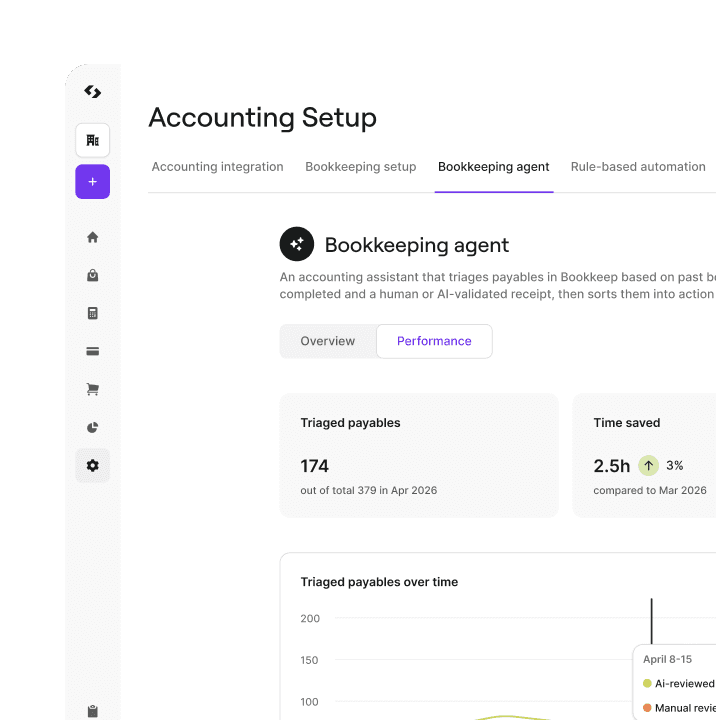
Choosing the right level of automation
Before designing an AI agent, we started with the user problem rather than technology. Through technical and user discovery, we explored whether the opportunity required simple automation, an assistant, or a more autonomous agent.
We identified the agent model as the best fit supporting multiple connected bookkeeping jobs.
Defining the agent’s job
To make the concept tangible, we translated the opportunity into Jobs To Be Done and defined the agent's responsibility before designing its interface. This helped us clarify what the agent should handle, where it should ask for input, and which decisions still required accountant review
We designed the boundary between agent autonomy and accountant judgement.
Designing an agent that could improve through collaboration
A useful agent could not be a one-way assistant that produced answers without accepting correction or context. We designed a feedback loop through user feedbacks, instructions and configurable capabilities, allowing accountants to steer the agent and improve the relevance of its support over time.
Impact
-1h/week
Time to prepare the bookkeping export
on average
70%
+2,5%
Adoption rate
82,5%
+3%
Acceptance rate

Choosing the right level of automation
Before designing an AI agent, we started with the user problem rather than technology. Through technical and user discovery, we explored whether the opportunity required simple automation, an assistant, or a more autonomous agent.
We identified the agent model as the best fit supporting multiple connected bookkeeping jobs.
Defining the agent's job
To make the concept tangible, we translated the opportunity into Jobs To Be Done and defined the agent's responsibility before designing its interface. This helped us clarify what the agent should handle, where it should ask for input, and which decisions still required accountant review
We designed the boundary between agent autonomy and accountant judgement.
Designing an agent that could improve through collaboration
A useful agent could not be a one-way assistant that produced answers without accepting correction or context. We designed a feedback loop through user feedbacks, instructions and configurable capabilities, allowing accountants to steer the agent and improve the relevance of its support over time.
Impact
-1h/week
Time to prepare the bookkeping export
on average
70%
+2,5%
Adoption rate
82,5%
+3%
Acceptance rate
Case study 3
Bookkeeping - Table View
From one-by-one bookkeeping to focused batch processing.
I helped redesign bookkeeping feature around the way finance accountants actually process high volumes of payables: scanning, prioritising, grouping, editing, and completing repetitive work in batches while preserving detailed review for complex cases.
Workflow design
System design
Data interface

Reframing speed as prioritisation
The initial challenge was not simply to display payables in a table. Accountants needed a way to understand the full workload, identify what required attention first, and prioritise by criteria such as amount, supplier, service period, receipt status, or processing stage.
I therefore framed the table as a decision-making and prioritisation tool, not just a denser version of the existing view.
Balancing overview and depth
A table could make repetitive work faster, but it also risked flattening the context accountants need to review individual payables. I designed the experience around a flexible overview with grouping, filtering, column configuration, and inline editing, while preserving access to a detailed payable view for more complex information such as analytical splits.
Making bulk actions powerful but safe
Bulk editing introduced a clear trade-off between efficiency and the risk of making mistakes at scale. I helped shape a model based on selection, contextual actions, validation, error feedback, and recovery mechanisms, so accountants could process multiple payables quickly without losing confidence or control.
Impact
-2h/week
Time to prepare the bookkeping export
on average
90%
+6%
Adoption rate
+15%
+4%
NPS score

Reframing speed as prioritisation
The initial challenge was not simply to display payables in a table. Accountants needed a way to understand the full workload, identify what required attention first, and prioritise by criteria such as amount, supplier, service period, receipt status, or processing stage.
I therefore framed the table as a decision-making and prioritisation tool, not just a denser version of the existing view.
Balancing overview and depth
A table could make repetitive work faster, but it also risked flattening the context accountants need to review individual payables. I designed the experience around a flexible overview with grouping, filtering, column configuration, and inline editing, while preserving access to a detailed payable view for more complex information such as analytical splits.
Making bulk actions powerful but safe
Bulk editing introduced a clear trade-off between efficiency and the risk of making mistakes at scale. I helped shape a model based on selection, contextual actions, validation, error feedback, and recovery mechanisms, so accountants could process multiple payables quickly without losing confidence or control.
Impact
-2h/week
Time to prepare the bookkeping export
on average
90%
+6%
Adoption rate
+15%
+4%
NPS score
Contact
Contact

